Partition Magic - Partition Manager Software
Extend partition with one step
Resize/Move partition without data loss.
Create, delete and format partion with simple steps. Copy partition and disk to transfer data with ease. Support disk and partition size larger than 2 TB. Keep your data safe even in case of power outages or hardware failure.
Resize/Move partition without data loss.
Create, delete and format partion with simple steps. Copy partition and disk to transfer data with ease. Support disk and partition size larger than 2 TB. Keep your data safe even in case of power outages or hardware failure.

Copy Partition
- There are three ways to start the Copy Partition function:
- 1. Click Partitions in the top menu » click Copy.
- 2. Click the button Copy in the Tool Bar.
- 3. Click Copy partition under the group Partition Operations in the Action panel.
-
This function can help you to copy the selected partition to the free space of a disk. Target disk can be the disk containing the selected partition or a different disk.
The procedure to Copy Partition is listed below.
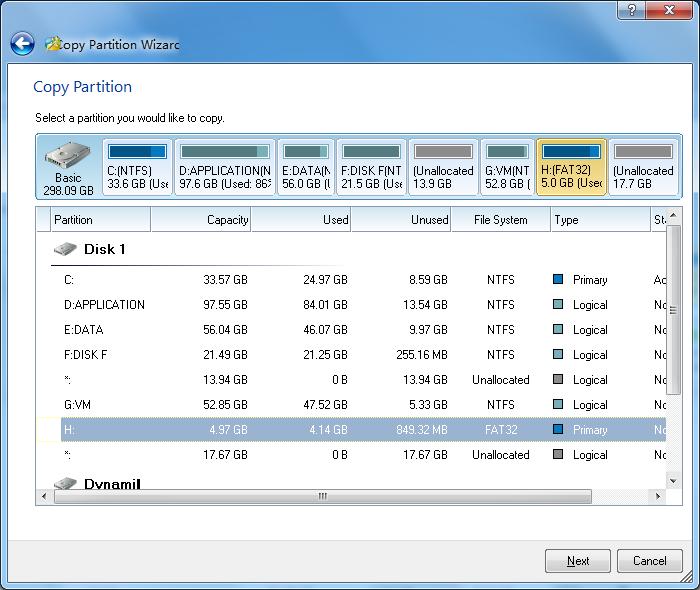
- a. First select the original partition. This is partition you want to copy.
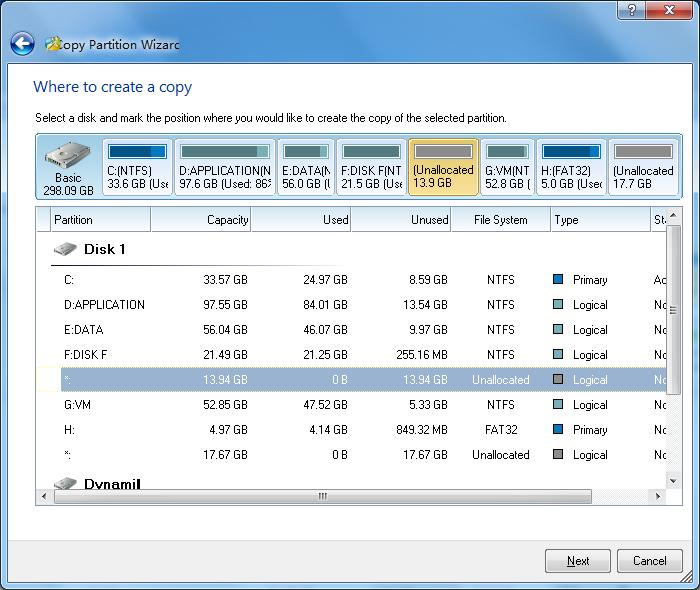
- b. Select the free space where you would like to copy the partition.
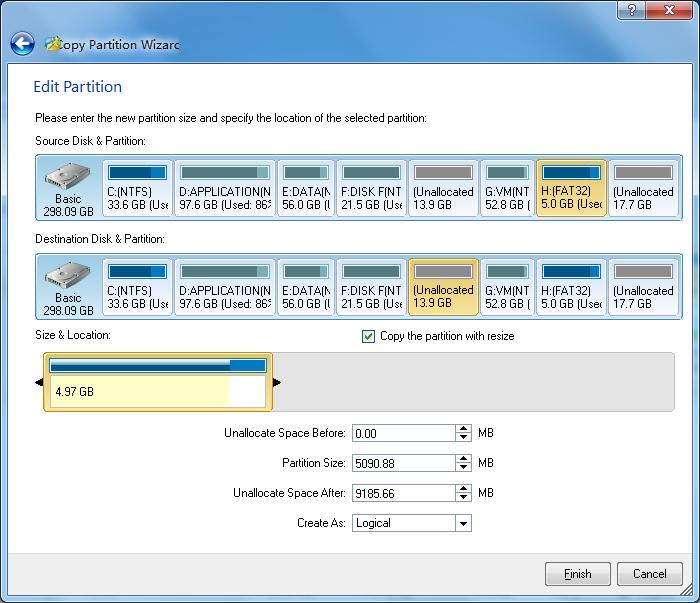
- c. Preview and set the capacity and location of the new partition, then set the type of the new partition.
- Tip: when you cancel Copy the partition with resize, MiniTool Partition Wizard will clone the original partition to the new partition.
Getting Started
- Hardware Requirements
- System Requirements
- Supported File System
- Supported Partition Table Type
- Supported Hard Disk Type
- Partitioning Basics
- What is hard disk?
- What is disk formatting?
- What is disk partitioning?
- What is file system?
- What is computer booting?
- What is LBA?
- What is CHS?
Using MiniTool Partition Wizard
- MiniTool Partition Wizard Basic
- General
- Menu Of View
- Disk Operations
- Align All Partitions
- Copy Disk
- Delete All Partitions
- Rebuild MBR
- Initialize to MBR Disk
- Initialize to GPT Disk
- Partition Recovery
- Wipe Disk
- Disk Properties
- Convert Dynamic Disk to Basic Disk
- Convert MBR Disk to GPT Disk
- Convert GPT Disk to MBR Disk
- Surface Test
- Partition Operations
- Split partition
- Extend Partition
- Align Partition
- Move/Resize Partition
- Merge Partition
- Copy Partition
- Explore Partition
- Create Partition
- Delete Partition
- Format Partition
- Label Partition
- Change Drive Letter
- Set Active/Inactive
- Hide/Unhide Partition
- Check File System
- Convert FAT to NTFS
- Convert NTFS to FAT
- Wipe Partition
- Partition Properties
- Set partition as Primary
- Set Partition as Logical
- Surface Test
- Change Partition Serial Number
- Change Partition Type ID
- Change Cluster Size
- Wizard
- Technical Support