Partition Magic - Partition Manager Software
Extend partition with one step
Resize/Move partition without data loss.
Create, delete and format partion with simple steps. Copy partition and disk to transfer data with ease. Support disk and partition size larger than 2 TB. Keep your data safe even in case of power outages or hardware failure.
Resize/Move partition without data loss.
Create, delete and format partion with simple steps. Copy partition and disk to transfer data with ease. Support disk and partition size larger than 2 TB. Keep your data safe even in case of power outages or hardware failure.

Check File System
- If you would like to check and recover file system to ensure the integrity of your files, you can use the Check File System function.
To start this function: click Partitions in the top menu » click Check File System.
A dialog box will appear, only if you select the function Check and Fix Detected Errors will MiniTool Partition Wizard attempt to recover mistakes found during the checking process.
Note: This function can only be used when the selected partition has a drive letter. For the partitions without drive letters, you should first label them with a drive letter and then use this function.
This operation will not be added to pending operations. Once you click start, MiniTool Partition Wizard will check the selected partitions immediately. 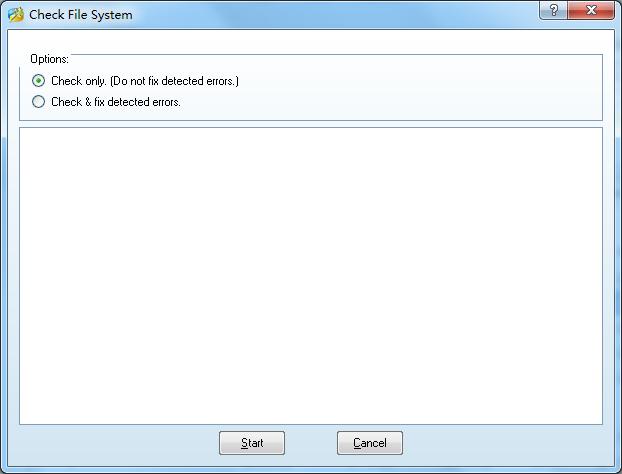
Getting Started
- Hardware Requirements
- System Requirements
- Supported File System
- Supported Partition Table Type
- Supported Hard Disk Type
- Partitioning Basics
- What is hard disk?
- What is disk formatting?
- What is disk partitioning?
- What is file system?
- What is computer booting?
- What is LBA?
- What is CHS?
Using MiniTool Partition Wizard
- MiniTool Partition Wizard Basic
- General
- Menu Of View
- Disk Operations
- Align All Partitions
- Copy Disk
- Delete All Partitions
- Rebuild MBR
- Initialize to MBR Disk
- Initialize to GPT Disk
- Partition Recovery
- Wipe Disk
- Disk Properties
- Convert Dynamic Disk to Basic Disk
- Convert MBR Disk to GPT Disk
- Convert GPT Disk to MBR Disk
- Surface Test
- Partition Operations
- Split partition
- Extend Partition
- Align Partition
- Move/Resize Partition
- Merge Partition
- Copy Partition
- Explore Partition
- Create Partition
- Delete Partition
- Format Partition
- Label Partition
- Change Drive Letter
- Set Active/Inactive
- Hide/Unhide Partition
- Check File System
- Convert FAT to NTFS
- Convert NTFS to FAT
- Wipe Partition
- Partition Properties
- Set partition as Primary
- Set Partition as Logical
- Surface Test
- Change Partition Serial Number
- Change Partition Type ID
- Change Cluster Size
- Wizard
- Technical Support